Share this starter pack
Download or share an image.




My Rec League Starter Pack

Bluesky Social
Bluesky wasn’t on Rec League’s list of social networks that you can add to your profile, so I’ll start by recommending that Rec League add it, and also recommending Bluesky generally. It’s a social network where you control the algorithm: Instead of a demented tech billionaire putting his thumb on the scale and deciding what gets shown to you and what doesn’t, Bluesky defaults to showing you all the accounts you’re following in chronological order, and then gives you the ability to choose whatever algorithm you want. It’s the only social network that I still use regularly.
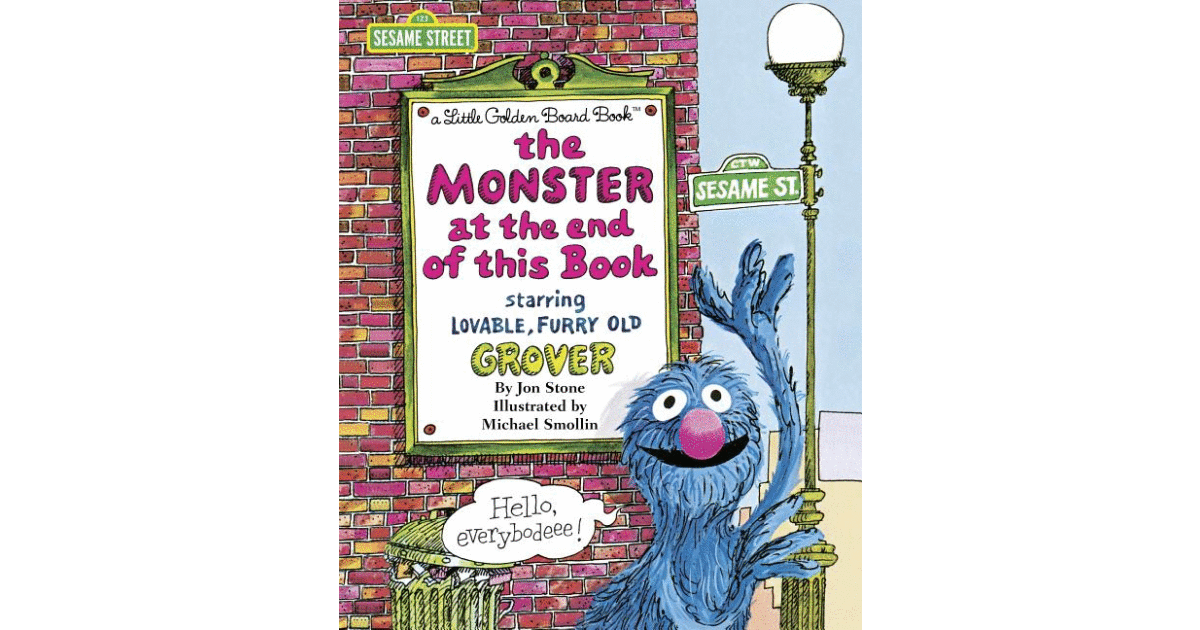
The Monster at the End of This Book
I bought a few books for the kids last week, and it turns out our five-year-old is at exactly the right age for The Monster at the End of This Book: Each time we read it, she wants me to go back to the first page and read it again. For those who’ve never had the pleasure, The Monster at the End of This Book has a delightfully meta plot: Sesame Street’s Grover learns the title of the book he is in, and so implores the reader to stop turning the book’s pages in order to avoid the monster. My five-year-old was howling with laughter as she turned the pages and Daddy voiced Grover’s reactions. My one bit of melancholy with this book is that my kids have had almost no exposure to Sesame Street – their media diet has been more Disney than PBS – and so they can’t fully appreciate how well (or poorly) Daddy is doing Grover’s voice. But maybe this book will end up being their intro to Sesame Street, so who knows?

Bambu Lab P2S 3D printer w/ AMS
From what I’ve gathered, 3D printing went through an inflection point about four years ago: Up until then, 3D printers were generally finicky and unreliable and, for most people, not worth the effort. They were hard to set up, had to be calibrated manually before each print, it’d take several rounds of trial-and-error to get something that resembled what you were trying to make, and you’d spend as much time maintaining the printer and as you did printing. 3D printing in more than one color was also its own separate ordeal. And then in 2022 a startup called Bambu Lab launched a Kickstarter to build a 3D printer with a wish list of features: automatic calibration, easy multi-color prints, built-in error detection, and all at a price point that would set the industry on its ear. That printer was the Bambu X1, and three or four generations later the P2S is Bambu’s mid-range printer, sandwiched between the entry-level A1 series and the higher-end X2D and H2 series. I’ve had my P2S for about two months, and it’s been going almost nonstop since it arrived: I’ve printed custom shelving that exactly fits the space under our bathroom sink, storage systems for the kitchen, bookshelves that fit various niches around the house, and dozens of toys for the kids. The P2S was easy to unpack and assemble, and was up and printing less than an hour from when it arrived. The P2S has also been low maintenance, although I will say this: You know how when there’s a paper jam in a 2D printer, you have to open little doors on the printer and go elbows-deep into the guts of the machine to clear it? Clearing a jam in the P2S requires partially disassembling the machine with the provided Allen wrenches. The good news is that the P2S has only jammed once so far, and when it did the printer’s touchscreen displayed a QR code that took me to excellent step-by-step instructions for taking the printer apart and putting it back together. But 3D printer maintenance is still at the “I am comfortable taking things apart with tools” level, not the “make an appointment at the Genius Bar” level. That being said, I’ve been very happy with the P2S: I’ve gone from having no experience at all with 3D printing to cranking out prints on a daily basis. It’s fun and useful.

ReciproCard - Get More Library Cards for Libby
If you’re using Libby or Hoopla to check out e-books from your local library, and are bumping up against your library’s limit on how many e-books you can check out at a time or how many you can put on hold (which is definitely not happening to me, I’m just speaking hypothetically here), this website will tell you which other libraries you’re eligible to join, so that you can get more library cards and double or triple your limit. If you live in Seattle, for instance, it will tell you that you’re eligible for a Seattle Public Library card and a King County Library System card, which will more than double how many books you can put on hold. (Again, hypothetically. I am definitely not rubbing my hands together and cackling with glee over here.)
My Rec League Starter Pack
Bluesky Social
Bluesky wasn’t on Rec League’s list of social networks that you can add to your profile, so I’ll start by recommending that Rec League add it, and also recommending Bluesky generally. It’s a social network where you control the algorithm: Instead of a demented tech billionaire putting his thumb on the scale and deciding what gets shown to you and what doesn’t, Bluesky defaults to showing you all the accounts you’re following in chronological order, and then gives you the ability to choose whatever algorithm you want. It’s the only social network that I still use regularly.
The Monster at the End of This Book
I bought a few books for the kids last week, and it turns out our five-year-old is at exactly the right age for The Monster at the End of This Book: Each time we read it, she wants me to go back to the first page and read it again. For those who’ve never had the pleasure, The Monster at the End of This Book has a delightfully meta plot: Sesame Street’s Grover learns the title of the book he is in, and so implores the reader to stop turning the book’s pages in order to avoid the monster. My five-year-old was howling with laughter as she turned the pages and Daddy voiced Grover’s reactions. My one bit of melancholy with this book is that my kids have had almost no exposure to Sesame Street – their media diet has been more Disney than PBS – and so they can’t fully appreciate how well (or poorly) Daddy is doing Grover’s voice. But maybe this book will end up being their intro to Sesame Street, so who knows?
Bambu Lab P2S 3D printer w/ AMS
From what I’ve gathered, 3D printing went through an inflection point about four years ago: Up until then, 3D printers were generally finicky and unreliable and, for most people, not worth the effort. They were hard to set up, had to be calibrated manually before each print, it’d take several rounds of trial-and-error to get something that resembled what you were trying to make, and you’d spend as much time maintaining the printer and as you did printing. 3D printing in more than one color was also its own separate ordeal. And then in 2022 a startup called Bambu Lab launched a Kickstarter to build a 3D printer with a wish list of features: automatic calibration, easy multi-color prints, built-in error detection, and all at a price point that would set the industry on its ear. That printer was the Bambu X1, and three or four generations later the P2S is Bambu’s mid-range printer, sandwiched between the entry-level A1 series and the higher-end X2D and H2 series. I’ve had my P2S for about two months, and it’s been going almost nonstop since it arrived: I’ve printed custom shelving that exactly fits the space under our bathroom sink, storage systems for the kitchen, bookshelves that fit various niches around the house, and dozens of toys for the kids. The P2S was easy to unpack and assemble, and was up and printing less than an hour from when it arrived. The P2S has also been low maintenance, although I will say this: You know how when there’s a paper jam in a 2D printer, you have to open little doors on the printer and go elbows-deep into the guts of the machine to clear it? Clearing a jam in the P2S requires partially disassembling the machine with the provided Allen wrenches. The good news is that the P2S has only jammed once so far, and when it did the printer’s touchscreen displayed a QR code that took me to excellent step-by-step instructions for taking the printer apart and putting it back together. But 3D printer maintenance is still at the “I am comfortable taking things apart with tools” level, not the “make an appointment at the Genius Bar” level. That being said, I’ve been very happy with the P2S: I’ve gone from having no experience at all with 3D printing to cranking out prints on a daily basis. It’s fun and useful.
ReciproCard - Get More Library Cards for Libby
If you’re using Libby or Hoopla to check out e-books from your local library, and are bumping up against your library’s limit on how many e-books you can check out at a time or how many you can put on hold (which is definitely not happening to me, I’m just speaking hypothetically here), this website will tell you which other libraries you’re eligible to join, so that you can get more library cards and double or triple your limit. If you live in Seattle, for instance, it will tell you that you’re eligible for a Seattle Public Library card and a King County Library System card, which will more than double how many books you can put on hold. (Again, hypothetically. I am definitely not rubbing my hands together and cackling with glee over here.)